arrow-left
All pages
gitbookPowered by GitBook
1 of 3

Loading...

Loading...

Loading...

getCurrentAccount

hashtag
How to call the API from an app

hashtag
What the API does

  1. Retrieves the currently connected account the user has selected on Metamask. If it's the first time, a new is created and the account info is saved in snap state.

  2. Returns the account info currently stored within the snap state. Note that this info may not be up-to-date with the info on the ledger. If you want to retrieve the most up-to-date info from the ledger, you will need to call .

Some example responses:

For a hedera account id 0.0.3581604:

hashtag
Live Demo on CodePen

circle-info
  • Note: Visit to activate your hedera account before you interact with the demo

  • If you're getting any errors with the live demo, make sure you go through the section to learn about what you may be missing. You need to install in your browser for the live demo to work.

const snapId = `npm:@hashgraph/hedera-wallet-snap`

const handleHelloAPI = async () => {
  await window.ethereum.request({
    method: 'wallet_invokeSnap',
    params: {
      snapId,
      request: {
        method: 'getCurrentAccount',
        params: {
          network: 'testnet'
        }
      }
    }
  })
}
To ease the integration of Hedera Wallet Snap on an application, we have created a template web application that you can run locally and check out the code in its entirety to learn how you can integrate and interact with various APIs exposed by Hedera Wallet Snap. Check out the full source code at template application github repositoryarrow-up-right.
  • You can also check out the API reference to learn how each API works.

  • snap account
    getAccountInfo snap API
    https://pulse.tuum.tech/arrow-up-right
    FAQs
    Metamaskarrow-up-right
     {
        "currentAccount": {
            "metamaskEvmAddress": "0x0b3628d1b838993b5fceec8b2a26502e7a8e5241",
            "externalEvmAddress": "",
            "hederaAccountId": "0.0.3581604",
            "hederaEvmAddress": "0xca53f9c93d30e0b7212d67901e5a24fb090d542b",
            "publicKey": "0x0206022cea4c6dd6d2e7263b8802253971de922f5380661d97cba82dee66f57ad6",
            "balance": {
                "hbars": 5.67332072,
                "timestamp": "Wed, 13 Mar 2024 20:37:05 GMT",
                "tokens": {
                    "0.0.3590430": {
                        "balance": 1,
                        "decimals": 1,
                        "tokenId": "0.0.3590430",
                        "name": "Token1",
                        "symbol": "KP1",
                        "tokenType": "FUNGIBLE_COMMON",
                        "supplyType": "INFINITE",
                        "totalSupply": "100",
                        "maxSupply": "0"
                    }
                }
            },
            "network": "testnet",
            "mirrorNodeUrl": "https://testnet.mirrornode.hedera.com"
        }
    }

    Snap State APIs

    showAccountPrivateKey

    hashtag
    How to call the API from an app

    hashtag
    What the API does

    1. Retrieves the currently connected account the user has selected on Metamask. If it's the first time, a new is created and the account info is saved in snap state.

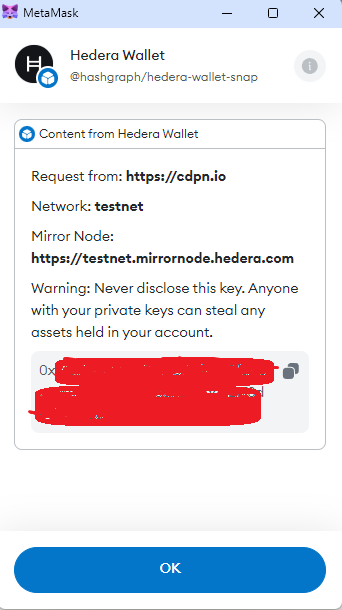
    2. Displays an alert dialog blox on Metamask with the private key of the snap account. The user can then copy it if they like. Note that the private key is never passed to the applications and is only displayed on the dialog box.

    Some example responses:

    For a hedera account id 0.0.3581604:

    hashtag
    Live Demo on CodePen

    circle-info
    • Note: Visit to activate your hedera account before you interact with the demo

    • If you're getting any errors with the live demo, make sure you go through the section to learn about what you may be missing. You need to install in your browser for the live demo to work.

    const snapId = `npm:@hashgraph/hedera-wallet-snap`
    
    const handleShowAccountPrivateKeyAPI = async () => {
      await window.ethereum.request({
        method: 'wallet_invokeSnap',
        params: {
          snapId,
          request: {
            method: 'showAccountPrivateKey',
            params: {
              network: 'testnet'
            }
          }
        }
      })
    }
    To ease the integration of Hedera Wallet Snap on an application, we have created a template web application that you can run locally and check out the code in its entirety to learn how you can integrate and interact with various APIs exposed by Hedera Wallet Snap. Check out the full source code at
    .
  • You can also check out the API reference to learn how each API works.

  • snap account
    https://pulse.tuum.tech/arrow-up-right
    FAQs
    Metamaskarrow-up-right
    template application github repositoryarrow-up-right
     {
        "currentAccount": {
            "metamaskEvmAddress": "0x0b3628d1b838993b5fceec8b2a26502e7a8e5241",
            "externalEvmAddress": "",
            "hederaAccountId": "0.0.3581604",
            "hederaEvmAddress": "0xca53f9c93d30e0b7212d67901e5a24fb090d542b",
            "publicKey": "0x0206022cea4c6dd6d2e7263b8802253971de922f5380661d97cba82dee66f57ad6",
            "balance": {
                "hbars": 5.67332072,
                "timestamp": "Wed, 13 Mar 2024 20:37:05 GMT",
                "tokens": {
                    "0.0.3590430": {
                        "balance": 1,
                        "decimals": 1,
                        "tokenId": "0.0.3590430",
                        "name": "Token1",
                        "symbol": "KP1",
                        "tokenType": "FUNGIBLE_COMMON",
                        "supplyType": "INFINITE",
                        "totalSupply": "100",
                        "maxSupply": "0"
                    }
                }
            },
            "network": "testnet",
            "mirrorNodeUrl": "https://testnet.mirrornode.hedera.com"
        }
    }