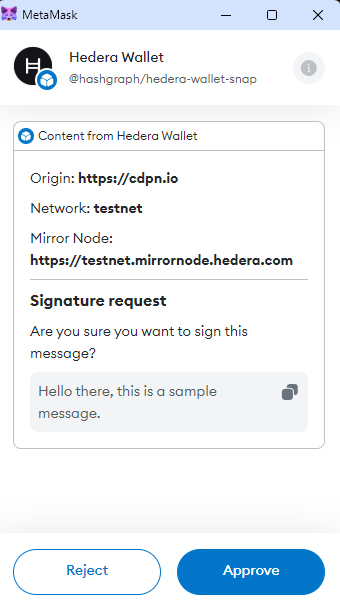
Hedera Wallet Snap connects to your currently connected Metamask account by default. To learn how apps can connect to Hedera Wallet Snap using a non-metamask(external) account, refer to this documentation.
Then, depending on whether you're trying to connect to a metamask account or a non-metamask account, you can call the snap API in the following way:
constsnapId=`npm:@hashgraph/hedera-wallet-snap`constsignMessageAPI=async () => {constexternalAccountParams= { externalAccount: { accountIdOrEvmAddress:'0.0.12345', curve:'ED25519' } }awaitwindow.ethereum.request({ method:'wallet_invokeSnap', params: { snapId, request: { method:'signMessage', params: { network:'testnet', message:'Hello there, this is a sample message. ',/* Uncomment the below line if you want to connect to a non-metamask account */// ...externalAccountParams } } } })}
What the API does
Retrieves the currently connected account the user has selected on Metamask. If it's the first time, a new snap account is created and the account info is saved in snap state.
Displays the MetaMask dialog box for the message to sign.
Signs the given message using the private key of the user.
Some things to keep in mind while interacting with the above demo
If you're getting any errors with the live demo, make sure you go through the FAQs section to learn about what you may be missing. You need to install Metamask in your browser for the live demo to work
To ease the integration of Hedera Wallet Snap on an application, we have created a template web application that you can run locally and check out the code in its entirety to learn how you can integrate and interact with various APIs exposed by Hedera Wallet Snap. Check out the full source code at template application github repository.
You can also check out the API reference to learn how each API works.